
OpenAI dots: a practical security guide for personal AI agents
Always-on agents such as OpenAI dots, Grok Bot, Meta Muse, Muse Code, and Instinct do more than chat. Here is how an SMB can discover them, contain their authority, and stop dangerous actions without slowing useful work.
Personal AI agents are becoming durable digital coworkers: they keep context, connect to company apps, work in the background, and sometimes reach a local computer. That changes the security question from whether a model can generate a bad answer to whether a delegated identity can cause a bad outcome. This guide explains the architecture, the real failure paths, the controls vendors provide, and the independent action layer a small business needs.
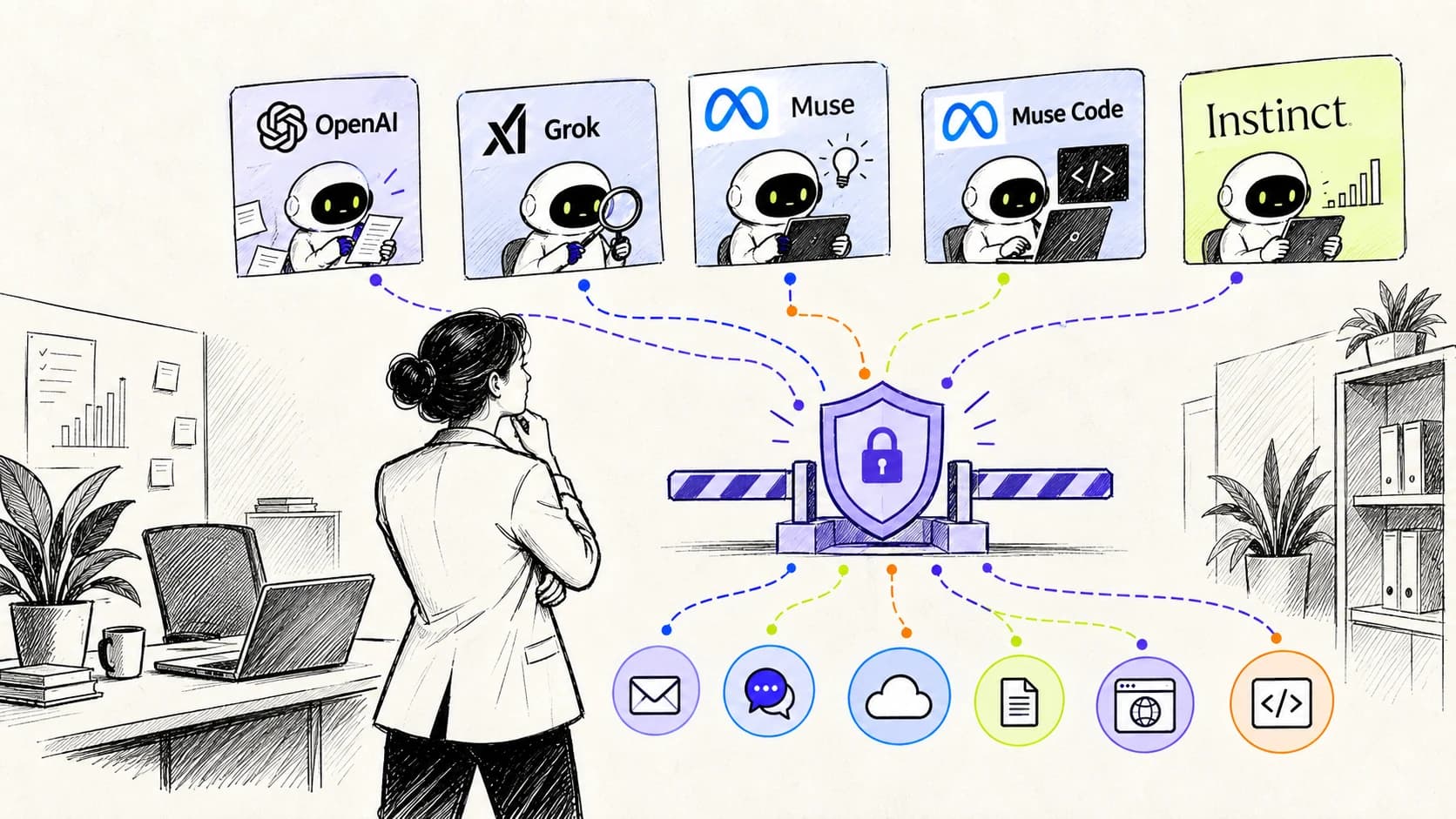
The important change is authority, not intelligence
A chatbot waits for a question and returns text. A personal AI agent can keep working after the conversation ends, remember how its owner operates, sign in to connected apps, use a browser or cloud computer, and carry a project across hours or days. OpenAI describes dots as always-on agents with their own cloud computer and access to thousands of apps. Grok Bot is designed as a persistent teammate. Meta says Muse works in the background across connected services. Instinct presents itself as an assistant that spans applications and devices.
That is useful precisely because the agent receives authority. It may be allowed to read company mail, draft and send a message, inspect a repository, prepare an invoice, update a customer record, or work on a local laptop. Once those permissions exist, the model's answer is no longer the main unit of risk. The unit of risk is the action performed with a real identity against a real system.
For a small business, this transition can happen before anyone creates an AI governance program. One employee connects an agent to email. Another installs a coding agent. A founder adds a bot to Slack. Each decision looks personal and reversible. Together they create a new workforce of delegated identities with access that may be broader than the company realizes.
Treat every personal agent as a new worker whose badge was copied from an existing employee—then ask who can use that badge, where it works, and which doors it opens.
Five products, several very different security surfaces
The category is not one technical design. OpenAI dots run primarily in an OpenAI-managed cloud computer and can use connected apps, messaging surfaces, and—when the user enables it—a local computer. Grok Bot runs as a persistent cloud teammate. Muse combines a vendor-hosted environment with connected services and a Mac application. Instinct reaches personal and business context through messaging, applications, and devices. Muse Code is different again: it is a coding agent in a terminal or CI environment, with repository and command access.
Those differences determine where security evidence can be collected and where an independent control can intervene. A terminal action may pass through a local hook before execution. A supported model request may pass through a local provider proxy. A cloud-only agent action may be visible only in the vendor's activity view, an admin audit API, an OAuth grant, or the destination application's own logs. If the vendor exposes no pre-action integration, an outside product cannot honestly promise an inline block inside that vendor's cloud.
The practical goal is therefore not to force every agent into one integration. It is to build one company policy from several evidence and enforcement points, while labeling the strength of each connection: discovered, observed, or enforceable.
- OpenAI dots: cloud computer, connected apps, messaging channels, and optional local-computer access.
- Grok Bot: persistent cloud teammate with web and plugin access.
- Meta Muse: background personal agent across browser, files, apps, and connected services.
- Muse Code: terminal and CI agent with code, shell, repository, and workflow access.
- Instinct: personal assistant spanning communications, applications, and devices.
The identity record needs more than an owner field
Security teams often begin by asking who created the agent. That is necessary, but it is not enough. In a shared channel, the owner may have connected the agent while a colleague supplied the request. A document author may have planted an instruction that influenced the plan. A plugin may have transformed the request. The eventual SaaS audit entry may still show only the owner's account.
A useful action record keeps six facts separate: the accountable owner, the human requester, the source content that influenced the decision, the agent and session, the credential or delegated grant, and the resolved target. For example: Maya owns the dot; Daniel asked it in a shared channel; a customer document supplied a hidden instruction; the dot used Maya's CRM OAuth grant; the final action attempted to export 240 contacts to a new domain.
This tuple is what turns an opaque AI incident into an explainable security event. It also prevents a common mistake: assuming that an action attributed to an employee in a destination log was consciously performed by that employee.
- Owner: who created or is responsible for the agent?
- Requester: who asked for this specific task?
- Influence: which page, message, file, memory, or tool result shaped it?
- Agent: which product, instance, session, and configuration acted?
- Authority: which account, token, plugin, or device permission was used?
- Consequence: what exact system, record, file, recipient, or command was affected?
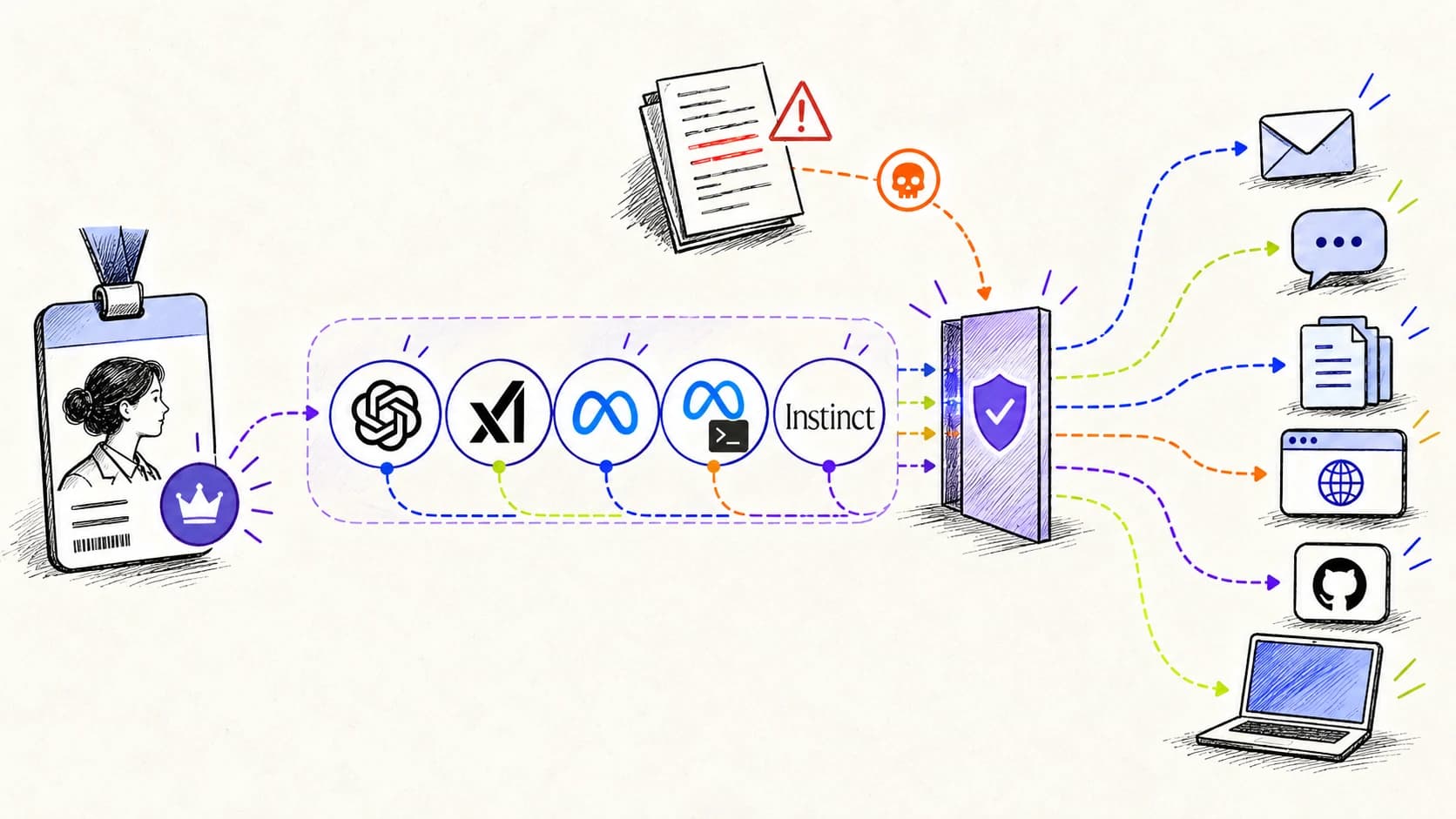
The failure paths an SMB should design for
Personal agents inherit all the familiar model risks, then add time, tools, and delegated access. A hallucination can become a sent email. A poisoned webpage can become a tool instruction. An overly broad OAuth grant can let a harmless request reach confidential records. A remembered preference can remain influential long after the employee forgets it was given.
Prompt injection deserves special attention because these agents continuously read content written by other people. An email, issue, document, webpage, or plugin response can contain instructions that compete with the user's goal. OpenAI's own safety material acknowledges prompt-injection risk and uses automated review and action checks as layers of defense. The correct lesson is not that one vendor has uniquely failed. It is that every tool-using agent needs controls that assume untrusted content will sometimes reach the model.
Shared channels create a separate confused-deputy problem. A teammate with modest permissions may be able to steer an agent connected by a more privileged owner. Even when the agent asks for approval, the prompt must reach the right approver with the real target and consequence—not merely a friendly summary written by the same model requesting permission.
- Privilege borrowing: someone steers an agent that holds another person's access.
- Indirect prompt injection: external content changes the agent's plan.
- Persistence drift: old memory, rules, or grants keep affecting new work.
- Silent scope expansion: a narrow task fans out across apps, files, or recipients.
- Attribution loss: destination logs show the owner but not the agent or requester.
- Revocation gaps: access is removed, but copied data, active sessions, or downstream artifacts remain.
Native safeguards are necessary, but they are not a company control plane
The major vendors are not ignoring these problems. OpenAI gives dot owners custom rules, action-review behavior, an activity view, permission controls, and monitoring. Meta describes permission checks and approvals for Muse, while Muse Code includes approvals and an operating-system sandbox. These controls should stay enabled. They are closest to the agent and can use context an outside system may not receive.
The organizational gap appears when a ten-person company uses four products. Each vendor expresses permissions differently. Each activity view is separate. One product may call something an approval, another a rule, another a plugin permission. A founder or IT lead cannot reliably answer which agent can send mail, which one can touch production, which exceptions are permanent, and which device is missing protection.
Independent governance should complement native controls, not replace them. The company layer defines consistent consequences—sending externally, reading secrets, changing production, spending money, publishing code—then uses the strongest available integration for each agent.
Keep the vendor sandbox and approvals. Add a company layer that can compare agents, enforce where possible, and state honestly where coverage is observation-only.
What OpenLeash does differently
OpenLeash is designed for the SMB that needs practical control without a long security-platform project. The desktop assessment discovers supported agents, configuration, hooks, tool servers, permissions, and risky project context on employee computers. The dashboard joins those findings to people, devices, projects, protections, approvals, events, and available cost or usage evidence.
At runtime, supported hooks and local provider traffic paths can send an action envelope to OpenLeash before execution. That envelope can include the agent, user, project, action type, resolved arguments, target, destination, and available provenance. OpenLeash applies deterministic protections and company rules, then returns allow, ask, or deny. Clear low-risk work continues. Ambiguous or consequential work can wait for an informed human. Clear violations stop before the side effect.
OpenLeash also keeps coverage evidence. Installing a desktop app is not treated as proof that every agent action is protected. The dashboard can distinguish a discovered agent from a verified hook, a visible provider path, and a tested enforcement point. That matters for personal agents because cloud, desktop, terminal, browser, and delegated subagent work do not share one interception mechanism.
- Discover supported desktop and terminal agents, related configuration, MCP servers, hooks, and permissions.
- Map activity to a person, device, agent, project, session, and action when the source exposes those facts.
- Detect sensitive-resource access, destructive operations, unsafe tools, and prompt-injection indicators.
- Apply company rules at verified pre-action checkpoints with allow, approval, or deny outcomes.
- Send security and coverage evidence to one admin dashboard built for operators, not employees.
- Label telemetry and enforcement gaps instead of presenting partial visibility as complete protection.
How OpenLeash secures OpenAI dots in practice
Start with the dot's authority map: owner, connected apps, shared channels, custom rules, local-computer permission, delegated tasks, and the systems those connections can reach. Keep OpenAI's native significant-action review enabled and narrow every plugin grant. A dot that only prepares internal research should not also have standing permission to send external messages or modify customer data.
When a dot connects to an employee laptop or delegates work into a supported local coding or tool path, OpenLeash Desktop can protect the instrumented local action boundary. The policy is evaluated against what the action will actually do: the command, file path, destination, repository, environment, or sensitive resource. This is where secret reads, broad deletion, production changes, and unapproved external sends can be blocked or escalated before execution—provided that exact path is integrated and verified.
For work that remains inside OpenAI's cloud, coverage depends on what OpenAI exposes to the customer's plan: activity, compliance or audit exports, admin events, and future pre-action integrations. OpenLeash can ingest supported evidence into the company view, but it cannot insert an inline decision into an opaque cloud action. In that case, enforce least privilege at the connected application, monitor the resulting system, and show the dashboard status as observed rather than protected.
This distinction is especially important when dots create Codex or ChatGPT Work tasks. A transcript or audit sync can support review and attribution after the event. It is not equivalent to a verified pre-tool callback. OpenLeash treats those capabilities separately so an administrator can see what is known, what is monitored, and what can actually be stopped.
For dots, the honest coverage model is layered: native OpenAI safeguards, least-privilege app connections, OpenLeash enforcement on verified local paths, and cloud audit evidence where the plan exposes it.
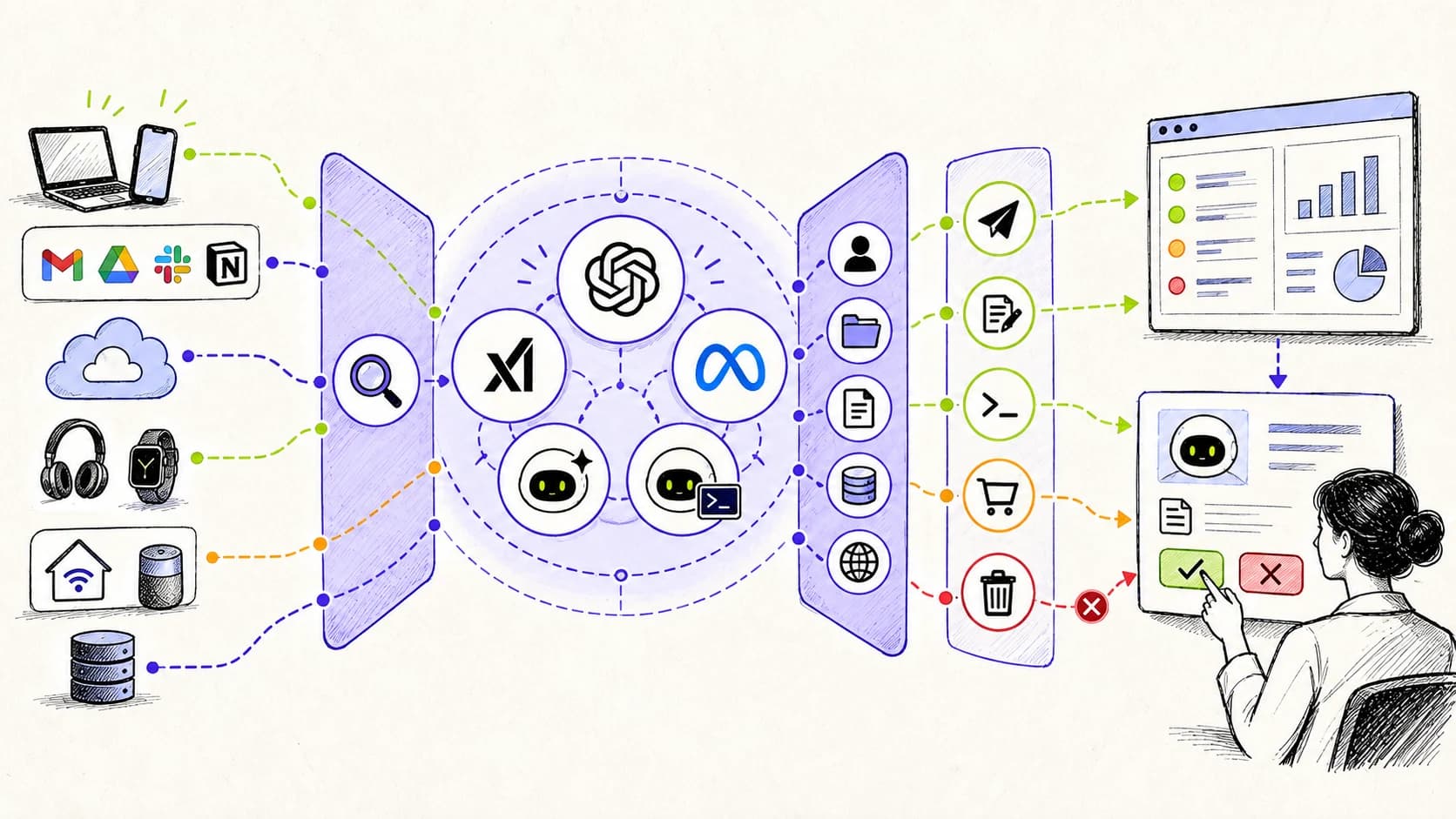
Use one consequence model across every personal agent
Product names will change faster than security policy. Write rules around consequences instead. The same external-send policy should apply whether the request comes from a dot, Grok Bot, Muse, a terminal agent, or a homegrown workflow. The same production-change rule should apply whether the agent uses a shell, a browser, an MCP server, or a vendor plugin.
A good decision request contains the resolved operation, target, identity, environment, destination, data sensitivity, and expected side effect. It should also show why the action is being requested and which untrusted sources influenced it. Avoid prompts such as 'Allow the agent to continue?' They encourage blind approval and teach employees to dismiss the control.
Use three outcomes. Allow reversible, bounded work that matches policy. Ask when the action may be legitimate but carries material consequence or uncertainty. Deny actions that violate a clear rule, exceed the declared scope, or lack enough context for a responsible decision. Keep the rules short enough that an employee and an administrator can both understand them.
- Send or publish outside the company
- Read, copy, or reveal secrets and regulated data
- Delete or overwrite files, records, infrastructure, or backups
- Change production, identity, permissions, billing, or security controls
- Install software, connect a new tool, or expand the agent's own authority
- Spend money or create a contractual commitment
A one-week rollout for a small company
Day one is inventory, not prohibition. Run the local assessment on the first company computer, review the agents and projects it finds, and list cloud agents that employees have connected. Assign an owner to each instance. Record where it runs, what it can reach, and whether the current evidence source is discovery-only, observable, or enforceable.
Next, remove obvious excess. Revoke unused OAuth grants, disable permanent approval exceptions, separate personal and company accounts, and keep production credentials away from general-purpose agents. Pick a small set of consequence rules and test them with harmless fixtures: a fake secret, a disposable directory, a test repository, and a mock external destination.
Finally, onboard the team with a simple promise: routine work should stay fast; consequential work should become clear. Measure false positives, approval time, uncovered paths, policy bypasses, and incidents avoided. Expand only after a representative action from each critical workflow has exercised the expected checkpoint.
- Inventory every personal agent and accountable owner.
- Classify each connection as discovered, observed, or enforceable.
- Reduce app grants and remove stale sessions before adding more tooling.
- Define five to ten consequence-based rules in plain language.
- Verify each supported checkpoint with safe allow, ask, and deny tests.
- Review dashboard coverage and exceptions weekly until the environment stabilizes.
What this architecture does not promise
No control layer makes an agent infallible. Models can misunderstand intent, native safeguards can miss an attack, endpoint software can be removed, employees can use an unapproved browser profile, and vendor APIs can omit important events. An honest program assumes gaps and makes them visible.
OpenLeash does not claim that seeing a model request means seeing every tool call, or that collecting a cloud transcript means an action was blocked. It does not treat a configured hook as verified until the path is exercised. It does not replace the destination system's permissions, backups, change controls, or audit logs.
The goal is more concrete: know which agents exist, constrain the authority they receive, interrupt high-consequence actions on supported paths, preserve evidence, and make missing coverage obvious enough to fix. That is a realistic security program for an SMB—and it is much stronger than hoping each employee finds the right settings in every new agent.
Frequently asked questions
Can OpenLeash protect a dot without an OpenAI enterprise plan? OpenLeash Desktop can still assess the employee computer and enforce on supported local action paths. Cloud-only visibility is more limited when the workspace plan does not expose administrative or compliance data, so the dashboard should identify estimates and coverage limits rather than fabricate precision.
Does OpenLeash replace the approvals built into dots, Muse, or Muse Code? No. Native approvals and sandboxes remain important. OpenLeash adds consistent company policy, cross-agent visibility, and independent enforcement where an integration supports it.
Can an agent in Slack act with its owner's permissions? That is the risk to test. Shared channels separate the requester from the credential holder. Restrict who can invoke the agent, narrow the connected account, and require approval for consequential actions where the platform permits it.
Should we ban personal AI agents until governance is perfect? Usually not. Start with inventory, least privilege, and verified checkpoints for the actions that could materially harm the company. A small, tested boundary is more useful than a broad policy nobody can operate.
Continue the research
- OpenAI: Introducing dots
- OpenAI Help: Getting started with your dot
- OpenAI Help: Dots privacy, security, and safety FAQs
- xAI Docs: Grok Bot overview
- Meta: Muse personal AI agent
- Meta developer docs: Muse Code
- Instinct: Official product overview
- OpenAI Deployment Safety Hub: Evaluating auto-review
- OWASP: Agentic AI Top 10